Interpreter 4: Parser
Table of Contents
For this part of the assignment, you'll implement a parser for Scheme, in C. (You must implement the parser from scratch - don't use Yacc, Bison, ANTLR, or any similar tool, even if you know what it is and how to use it.)
This assignment is to be done individually. You should not work with your interpreter partner on this assignment. You can talk to other people in the class to come up with ideas and get help with general concepts, but you should not show others your code, nor see others' code. You can get direct help debugging from Anna and any of the course staff (graders, lab assistants, prefects).
Both you and your interpreter project partner can access your code from the previous part by downloading it from Gradescope.
1. Get started
Download the folder with the starter code from the link below. Like for previous homeworks, unzip the folder and move it to where you'd like: most likely the folder for the Docker container. Then get started in VS Code.
If when running tests you run into a permissions error, you can fix this by running the following code in the terminal:
chmod a+x test-e test-m
This tells the computer that all users should be permitted to execute (run)
the files test-e and test-m.
2. Assignment details
You should create a parser.c file that implements the functions specified in
parser.h. Particularly, you will need to write a function parse that uses
the token list from the last assignment to construct a list of parse trees.
For example, here is a syntactically correct Scheme program:
(define x (quote a))
(define y x)
(car y)
Any Scheme program consists of a list of S-expressions. An S-expression always has parentheses around it, unless it is an atom. Note that a Scheme program itself, then, is not a single S-expression; it is a list of S-expressions.
Your parse function should therefore return a list, using the linked list
structure that we have been using, of parse trees.
A parse tree, in turn, uses
the linked list structure again to represent a tree. For example, the expression
(define x (quote a)) would become the following parse tree, where each box is
a SchemeItem:
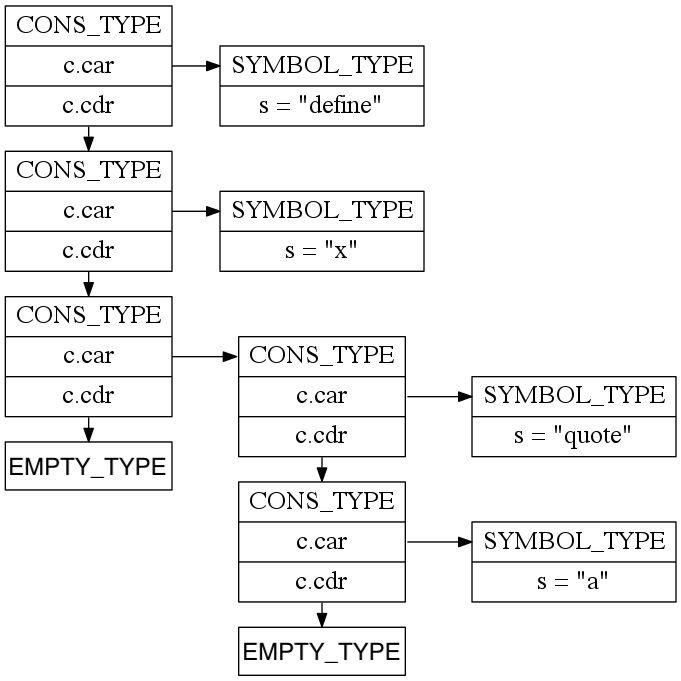
The above parse tree structure would be the first item in a 3-item linked list that represents the above Scheme program.
Do not include parentheses in your parse tree. Their purpose is to tell you the structure of the tree, so once you have an actual tree you don't need them anymore - they'll only get in the way. (Technically, this means that you're creating an abstract syntax tree, not a parse tree, since not all of the input is preserved.)
Parsing languages can be pretty complicated. The good news is that parsing Scheme is relatively straightforward. Since your Scheme code IS a tree, you just need to be able to read it as such and turn it into a tree in memory. You can do it with a stack of tokens:
- Initialize an empty stack.
- While there are more tokens:
- Get the next token.
- If the token is anything other than one of the close grouping symbols, push it onto the stack.
- If the token is close grouping symbol, start popping items from your stack until you pop off the matching open symbol (and form a list of them as you go). Push that list back on the stack.
So you'll need a stack… your linked list is a fine candidate for it.
One small extension to the idea above: you'll end up with a stack at the
end, and you'll need to decide what to do with it. You'll want to be
sure to remember that you are reading a list of
s-expressions, not just a single s-expression, and the list you return
should match the order of the file. I.e., in the example above,
(define x (quote a)) was the first thing in the file, and its parse
tree should be the first item in a 3-item linked list if parsing the
entire example above.
At the end of parsing a file, make sure you check that you don't have
any open grouping symbols that are still waiting to be closed (i.e.,
(define a 3 should lead to a parse error!). Using a variable to
store the current depth of the tree may be helpful. This variable
could start at 0, and track how many open parentheses we're waiting
to close at any given time.
You'll also need to write a printTree function. The output format for a parse
tree of valid Scheme code is very simple: it looks exactly like Scheme code! To
output an internal node in the parse tree, output ( followed by the outputs of
the children of that internal node from left to right followed by ). To
output a leaf node (a non-parenthetical token), just output its value
as you in the tokenizer, sans type.
When printing, you'll always use ( and ), regardless of whether
the original code used brackets or parentheses. Your parse tree
shouldn't actually know whether the original code used brackets or parentheses!
3. Syntax errors
As with the tokenizer, your parser should never crash with a segmentation fault, bus error, or the like. Here are the different types of syntax errors you should handle:
- If the input code ever has too many close grouping symbols (in other words, if you
ever encounter a closing symbol that doesn't match a previous open paren), print
Syntax error: too many close parentheses. - If the
parsefunction returns an incomplete parse tree and the end of the input is reached and there are too few close parentheses, printSyntax error: not enough close parentheses. - If the
parsefunction encounters mismatched parentheses like([)], print something beginning withSyntax error. You may follow that with whatever error message you like to describe the situation.
If you ever encounter a syntax error, your program should exit after printing
the error - don't do any more parsing. This is why we wrote the function
texit. Before exiting, you should output the text "Syntax error". Also feel
free to print Scheme code around the error to be helpful if you can,
though this is
optional.
Most production parsers continue to try to parse after an error to provide additional error messages. Your efforts here may help you to gain some sympathy as to why all error messages after the first one are questionable!
4. Sample executions
$ cat test-in-01.scm
(if 2 3)
(+ ))

$ cat test-in-02.scm
(define map
  [lambda (f L)
    (if (null? L)
        L
        (cons (f (car L))
              (map f (cdr L))))])

$ cat test-in-03.scm
1 2 (3)

$ ./interpreter < test-in-01.scm
Syntax error: too many close parentheses

$ ./interpreter < test-in-02.scm
(define map (lambda (f L) (if (null? L) L (cons (f (car L)) (map f (cdr L))))))

$ ./interpreter < test-in-03.scm
1 2 (3)
- Sample code
Here is a rough approximation of part of my parse function. My addToParseTree
function takes in a pre-existing tree, a token to add to it, and a pointer to an
integer depth. depth is updated to represent the number of unclosed open
parentheses in the parse tree. The parse tree is complete if and only if
depth is 0 when the parse function returns.
SchemeItem *parse(SchemeItem *tokens) {

    SchemeItem *tree = makeEmpty();
    int depth = 0;

    SchemeItem *current = tokens;
    assert(current != NULL && "Error (parse): null pointer");
    while (current->type != EMPTY_TYPE) {
        SchemeItem *token = car(current);
        tree = addToParseTree(tree, &depth, token);
        current = cdr(current);
    }
    if (depth != 0) {
        syntaxError();
    }
    ...
}
You're not required to use this code skeleton, as there are plenty of other
good ways to structure your code, instead. For instance, if you wanted to
more explicitly represent the different between the parse stack and tree,
you might replace tree with parseStack.
5. Helper functions
You'll note that you may want helper functions in parser.c (or
indeed, in any number of other locations). A common question is whether you
can/should modify the .h files to add these functions. Generally, you
would only do this if you intend for these functions to be called
outside of the file in which you're defining them. Since we won't need
to do that for this project, you should not change the .h files
you're given (and doing so may break the Gradescope tests).
If you're writing helper functions without putting them in .h files, you might experience an
error about something being undefined. This occurs during compilation
because the compiler doesn't know that the function will be defined
later in the file. You have two options:
- Declare a protoype for the function within your
.cfile, underneath your includes, just as you would in the.hfile. The prototype is just the function return type, name, and parameters, without the body - each function part in the.hfile is a prototype. Within that.cfile, this is equivalent to having put all the prototypes in the.hfile, but outside of that.cfile, no one else knows about the function. - Write the function prior to calling it. This is basically strategically ordering your file so functions that are called by other functions are defined before the functions that call them.
If you want to add in additional .c and .h
files to separate out particular functionality, that is possible (but not
at all required). If you do this, please modify the justfile to include
these .c and .h files. The grader will be using your version of the
justfile, not the original copy (that also allows you to switch to our
binaries if need be).
6. The single quote
Dealing with the special case of the single quote (i.e. 'a, or '(a b c)) means that we need to redefine “push onto the stack,” which appears a few times in the parsing algorithm. Here is the new definition of “push onto the stack”, which you only need to pass all of the E tests:
- Proceed as usual so long if the stack doesn’t have a single quote ' on top.
- Also proceed as usual if pushing on a left paren, no matter what the stack looks like.
- In all other cases…
- Pop the single quote off the stack.
- Then proceed as if the token sequence had (quote ….) wrapped around the value you’re pushing. In other words, create a new subtree consisting of quote and the new token, and then push that subtree onto the stack instead of the original value you were going to push.
7. Capstone extensions
For the final project submission, you will get to choose what additional functionality you want your interpreter to have, and you'll implement (several small, a few medium, or 1-2 large) enhancements.
- Format your output so that it resembles Guile output as closely as
possible. Specifically, don't have an extraneous space after the last item in a list before the closing paren. (Small enhancement)
- Correctly handle square brackets. Some dialects of Scheme allow you to use square brackets as an alternative to
parentheses anywhere you like, so long as they match accordingly. Here is an example:
(define [lambda (x) [+ x 1]])
Once your parse tree is constructed, you should retain no memory of whether parentheses or square brackets were used,
and your output should only show parentheses (just as Guile does). However, you'll need to add some extra details
to the parse to make sure the input is correct. For example, even though you'll eventually transform (a [b c] d)
to (a (b c) d), the input (a [b c) d] should result in a syntax error. (Small enhancement, requires you to also
handle square brackets in Tokenization.)
- Correctly parse dotted pairs, e.g.
(a . b). (Medium enhancement, requires you to also handle dotted pairs in Tokenization and in Evaluation.)
8. How to build your code
Look back at the tokenizer assignment, in the section titled "The files that you start with," on how to build your code as well as how to use my binaries for the previous assignments if you wish.
9. How to test and submit your work
9.1. Testing your work
As with previous assignments, there are M tests and E tests. See the section of Scheme Intro 2 labeled "How to test your work" if you need a refresher on how to run these tests. Note that the interpreter tests will fail if your code has compiler warnings and/or valgrind errors. Make sure to run the tests in the Docker environment.
9.2. Submitting your work
9.2.1. Acknowledging help
You should already have a file CollaborationsAndSources.txt
in your working directory (if not, copy it over from the previous assignment).
Go to the header for this portion of the assignment and fill in the document.
Did you share strategies with anyone else? Talk about any annoying errors and get advice? These are
fine things to do, and you should note them in the CollaborationsAndSources.txt
file. Give the names of people you talked with and some description of
your interactions. If you used any resources outside of notes taken in class or the homework/lab starter files that
Anna provided, that is also something to note.
If you didn't talk with anyone or use any outside sources, please note
that explicitly in CollaborationsAndSources.txt.
9.2.2. Generating the submission file and uploading to Gradescope
After completing CollaborationsAndSources.txt and finishing the
assignment, run ./zipitup (if you get a permissions error, run chmod u+x ./zipitup first).
This script will create a zip file XXX_submission.zip where XXX is the assignment name or number.
Note that this zip file with include your C files, any new header files you created,
and CollaborationsAndSources.txt. We will re-copy in our version of the tests and of the provided
header files.
Upload the zip file to Gradescope.
On Gradescope, you should see autograder output for the same tests as you ran locally. There is a small chance that the tests will fail on Gradescope, even if they passed on your own computer. Usually this means that you coded something in a different way than we expected when writing the autograders. We will be grading based on the results of the tests on Gradescope, so make sure to pay attention to the results of the tests there. (If you run into this issue, check that you are submitting to the correct assignment on Gradescope. Then try resubmitting and rerunning the autograder. If the error messages are legible, feel free to debug further, but it's also fine to reach out to Anna or the graders at this point.)
9.2.3. Grading
You'll earn at least an M if the following conditions are all met:
- All M tests pass
- A visual inspection of your code shows that you have not hyper-tailored your code to pass the tests. Hyper-tailoring your code would be doing things like checking for the exact input from the test, meaning you haven't written your code in a way that would work for similar inputs.
- You have a
CollaborationsAndSources.txtfile with the information described above. - Your code has significant stylistic or efficiency issues that we have not explicitly covered in class or on the feedback for a previous assignment.
You'll earn an E if:
- All conditions above for an M are met.
- All the E tests pass.
- Your code is not significantly more complex than needed to accomplish the task.
- You have a comment before each function describing what the function does (its input/output behavior, not a play-by-play of "first checks… then makes a recursive call …").
- Your code follows good style convention.
If your code does not meet the criteria for an M or an E, then you'll earn a
grade of NA (Not Assessable) or SP (Some Progress) for the assignment. Not Assessable means that your submission does not
have an attempt at one or more functions in the assignment. Some Progress means
that your submission has some code (in the correct language) for all functions in the
assignment, but that the code does not pass all of the M tests, is
hyper-tailored to the tests, and/or is missing a CollaborationsAndSources.txt
file.
The revisions policy for interpreter project assignments is in flux – if you're reading this, please email Anna and tell her to decide on a policy!
Good luck, ask questions, and have fun!
This assignment was originally created by David Liben-Nowell and has since been updated by Dave Musicant, Jed Yang, and Laura Effinger-Dean. Thanks for sharing!