Strings and debugging lab
This is a lab activity, not an assignment. Therefore, it's not required that you complete it or hand it in. However, the concepts in this lab will be useful for completing the homework assignments (and will be useful for exams down the road), so I'd encourage you to put in a serious effort on it in class, and to consider finishing any remaining parts outside of class.
Goals: Practice writing tests to check that your code works correctly, learn to use a debugger to have this as a tool as a programmer, and get practice with string manipulation.
Setup
Log into a lab computer, mount COURSES, and navigate to your STUWORK directory. Look back at the lab from the first day of class or get help from Anna or Rachel if you need a reminder on how to complete these steps.
Create a folder in your STUWORK directory called stringsLab. Open VSCode, and drag the stringsLab folder
into the VSCode window.
Then, download the starter code from this url
(click the download icon in the upper right corner). Move the file, which is called
stringCode.py, into your stringsLab folder.
Check your setup by opening a terminal window in VSCode and running python3 stringCode.py. If everything
is setup correctly, the code should run and print some code (final line: "Test passed: False").
Writing tests
When we write code, we have to make sure it works! Testing your code as you go allows you to catch bugs earlier and identify the problem with less effort, compared with writing lots of code and trying to test many different functions all at once. A good set of tests does both of the following:
- Tests the code on a range of inputs. This should include both "typical" cases and edge cases. For example, if you're writing a function that uses a string as a parameter, what happens if you run the function on an empty string?
- Ensures that the tested inputs cover all possible behavior of the function. For instance, if you have an if/else block in your code, do you have tests that will use the if block as well as the else block?
Write several tests for the swapCharacters function in the code. Your tests should go in main and should
call swapCharacters. See my test for an example. Once you've written your tests, run python3 stringCode.py
from the command line to see whether swapCharacters works correctly.
Using a debugger
Now, you'll try using VSCode's debugger to debug your code. You can add a "breakpoint" to the code by clicking just to the left of the line number where you want a breakpoint. Breakpoints in debugging are spots where you want the code to stop. The red dot next to line 15 shows that I've added a breakpoint there:
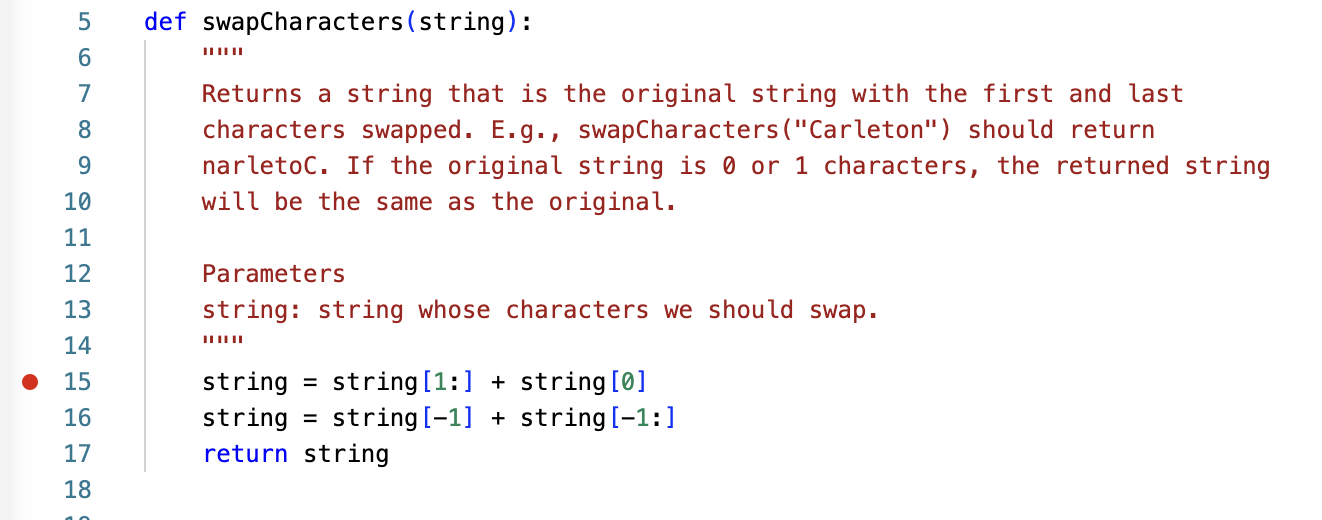
Add a breakpoint to your file by clicking to the left of line 15 (where you see the red dot in the picture). Ask for help if you get stuck.
Now you'll start debugging by going to Run->Start Debugging (from the menu at the top of the screen). It may pop up and ask you to select a debugging configuration. Choose the top one, for debugging the current Python file. You program will start running and then stop when it hits line 10. It shows the variables to the left and the debugger options near the top of the screen.
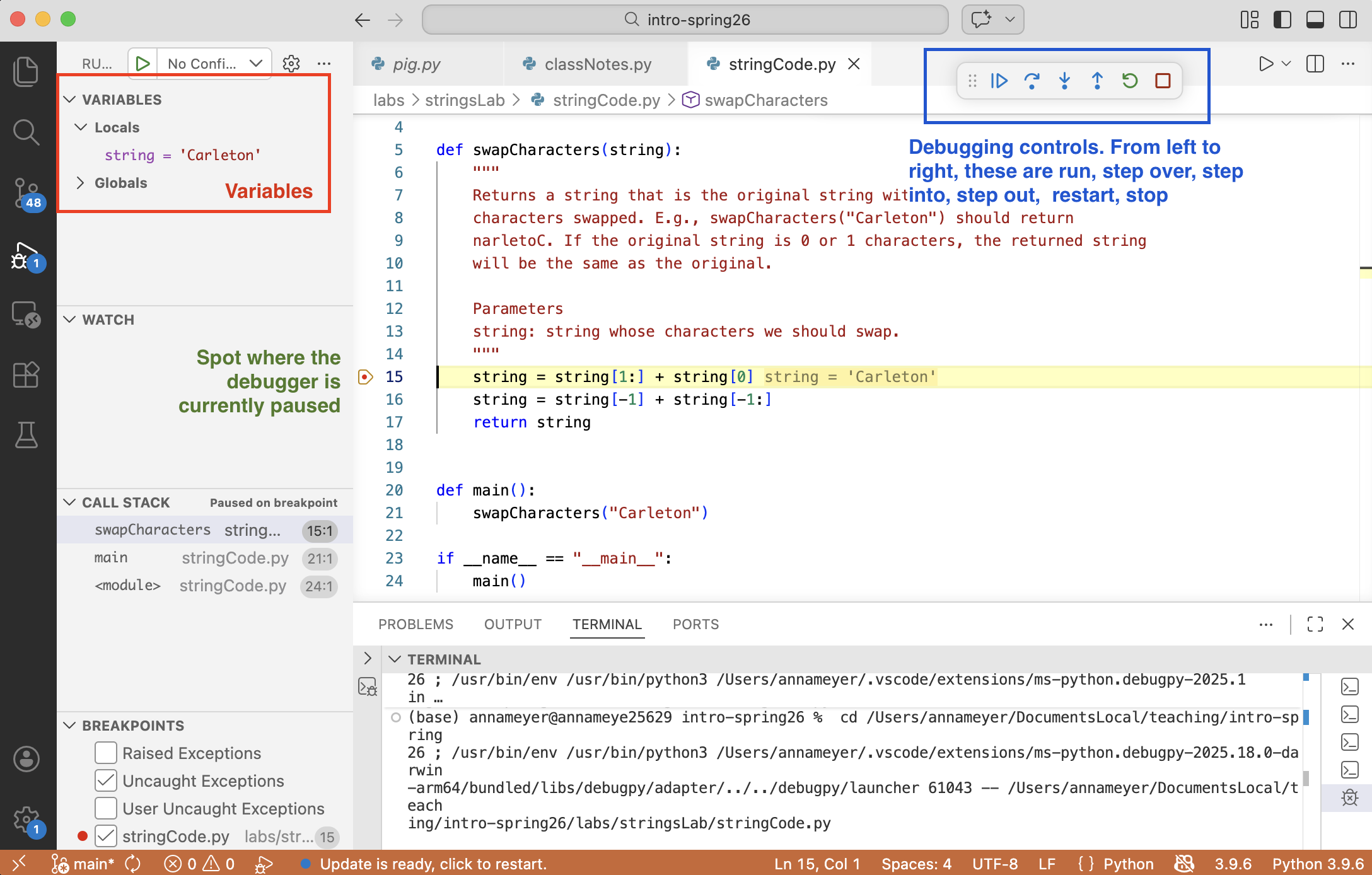
The screenshot highlights a few important things:
- The variables: you can view the names and values of the current variables. This is a helpful way to not have to print as much!
- The arrow next to line 15 shows the spot where the debugger is currently stopped. Your code has executed up to that line, but the line of code being pointed to has not yet been executed.
- The debugging controls:
- Run: resume execution of the code. Your code will continue running until it reaches a breakpoint or the program ends (either because all the code has executed or because of an error)
- Step over: Execute the current line of code, and stop at the next line of code in the current function. Or, if the current function is complete, stop where the function was called from.
- Step into: Begin executing the current line of code and stop at whatever next line of code is reached, excluding code in built-in Python libraries, but including if that line is in a function being called by this line of code.
- Step out of: Execute the rest of the current function, and stop again when that's complete.
- Restart: restart the program again from the beginning.
- Stop: end the program immediately, without running anything further.
Experimenting with the debugger
swapCharacters
Try stepping through the swapCharacters function and examine what it does. Look at the values of the
variables within the debugger, and discuss with your partner why the characters are not swapped correctly.
Fix the swapCharacters function so that it properly swaps the first and last character. Rerun your
tests from the command line to see if it works. If not, go back to the debugger to try to figure out
what's happening and how to fix it.
Step over, step into, and step out
Now, you'll experiment to try to understand the difference between step over, step into, and step
out of. In main, add a call to exploringDebuggerOptions. You can call it with an input of any
string you like. Add a breakpoint to the first line of exploringDebuggerOptions. Try starting the
debugger, and experiment with different debugger controls. Make sure both you and your partner understand
what each control is doing, and that you can explain it to each other.
Debugging reverseString
Try writing some tests in main for the reverseString function. (Don't delete your old tests, just add
your new ones after the old ones.) Then run the tests on the command line. You should find that
reverseString doesn't work correctly, either.
Use breakpoints and try to figure out what's happening in reverseString and then fix the error.
Try to fix the code so that the same algorithm is being used (i.e., don't just erase the code and
write new code that follows a different procedure to reverse the string).
Extra time?
- Type up your solution to one of the coding problem from Monday's worksheet (
quadrupleCharacters,isPalindrome,fibonacci) and write tests to see if your solution works correctly. If it doesn't, use the debugger to fix the problem. - Try writing the following functions, then write tests to verify that they work correctly:
- (easier)
noVowels(string)(returns a copy ofstringwhere all vowels have been removed) - (harder)
camelToSnake(string)convert a camel case string (e.g.,camelCaseorthisSentenceIsCamelCase) to the snake case version of that string (e.g.,snake_caseorthis_sentence_is_snake_case)
- (easier)
Anna's acknowledgements
This lab was adapted from one by Anna Rafferty. Thanks for sharing!